Spec Driven Development with Kiro
1. Introduction#
Like many software developers, my big wow moment with AI tools was getting access to Claude Code. ChatGPT was fun, but for production coding it was little more than a party trick — bits of generated code that could be copy-pasted, but nothing more. GitHub Copilot as a VS Code extension was a step forward, but it had a fundamental problem: it was only showing and writing code. And writing code is not the only thing a software developer does.
Then came Claude Code, handing control to your terminal. Genius? Scary? Both. Suddenly I could work directly with existing repositories, stop Googling for the right regex, and skip the manual boilerplate. But like every AI tool before it, the initial productivity gains eventually levelled off. Beyond minor to medium code changes, progress stalled. And good luck trying to maintain the standards of clean design I care about in my codebase. That is when I started looking for something different and found spec driven development.
In this post I will talk about Kiro, an IDE by AWS built around spec driven development — how it differs from vibe coding, why production-grade code is (almost) achievable with it, and what an end-to-end workflow actually looks like. It is also an honest account of why I rarely reach for Claude Code anymore.
I am on an ongoing quest to understand what mechanisms make production-grade software changes possible — and note, code is not the same as a software change — and to test those mechanisms through small, deliberate experiments. This post is a summary of my experiments with Kiro between October and November 2025.
2. Why I Chose Spec Driven Development over Vibe Coding#
Spec Driven Development (SDD) is a development approach where you start with a specification, not code. Before a single line is written, you lay out what the system or feature should do — requirements, behaviours, edge cases, and constraints. Rather than “vibe coding” (quick, informal prompts to an AI), SDD brings a design-first discipline to AI-assisted engineering: the spec becomes the governance interface between human intent and AI execution.
At the time of exploring spec driven development, I was aware of two tools in this space: GitHub Spec Kit and Kiro.
My motivation came from a set of frustrations I kept running into when using Claude Code directly for production-grade work.
Writing lines of code was never where a software developer spent most of their time. The real work is to think — to strategise on a good design, break it into chunks, and then execute. This means operating non-linearly across different threads of thought, anticipating how the building blocks will fit together before a single line is written. When working with Claude through a prompt, you quickly run into the limits of that model. Ideally you would think and plan in detail separately first, then come to Claude with a clear outline. But even that has its challenges:
- Context window limits. Claude Code has a 200k token context window, which sounds generous — but with a chunky codebase I would hit the limit after barely 6–7 interactions.
- Designing on the fly. I found myself changing my mind as I went, which meant a very linear, thread-by-thread approach. Each new direction meant a new thread, which meant hitting context limits all over again.
- Code design rigour. I care deeply about how code is structured. When patterns weren’t documented for AI tools, I’d document them myself — which spawned more threads and compounded the context problem.
- Losing ownership of code you didn’t design. Vibe coding can feel productive in the moment — you review what the agent writes, approve it, and move on. But when you return to that code in a later session and the agent gets stuck, you have no foothold. You didn’t make the design decisions, so you can’t meaningfully intervene. I needed an approach that kept me in control of the design — not just the review.
- Wanting a real design-first partner. I wanted something closer to pair programming: a space to formalise requirements and spar on design before writing a single line of code. Cramming all of that into a Claude Code prompt wasn’t working.
- Prompts are a poor vessel for context. There is only so much you can communicate about requirements and design patterns through a prompt. The typical flow would be: I explain something, Claude implements it differently from what I had in mind, I intervene, and so on. The deeper this back-and-forth went, the more the chain of thought unravelled. I needed a way to share persistent context with the AI — something that lived outside of prompts entirely.
- Rate limits. A minor gripe, but the artificial rate limits on Claude Code grew tiresome regardless of which subscription tier I was on.
3. Using Kiro#
Kiro is an AI IDE built by AWS, designed around spec-driven development. It is built on VS Code, so if you are already comfortable in that environment the transition is seamless. One of my mentors pointed me towards it and I signed up for the waitlist — I finally got access in October 2025. The models available are all from Anthropic’s Claude family — Auto (Kiro’s default intelligent router), Claude Opus 4.6, Claude Opus 4.5, Claude Sonnet 4.5, Claude Sonnet 4.0, and Claude Haiku 4.5.
3.1 Development Cycle in Kiro#
Kiro’s development cycle revolves around three stages: defining requirements (what you want to build), producing a design (how it should be built — architecture, data flow, code structure), and generating a sequenced list of tasks to execute. For each of these stages, Kiro produces a corresponding document — requirements.md, design.md, and tasks.md — which together form the spec for a feature. In practice, I fine-tune the design document heavily — that’s where the real thinking happens — while the requirements and task list are mostly good out of the box.
To make this concrete, here’s an example from my own project. I was storing user avatar images as binary blobs directly in PostgreSQL — cheap to build, but not cheap to run. I wanted to move them to Cloudflare R2 to cut storage costs and keep the database lean. Honestly, I was being frugal. This is the kind of bootstrap-level plumbing that, once the architecture is agreed on, you just want to hand off and not think about again. So I described the problem to Kiro and let it take the wheel.
Step 1 — Requirements
Kiro first produced a requirements.md. Here’s a sample of what it came up with — not all of it, but the parts that shaped the design most:
Requirement 1: As a system administrator, I want to migrate avatar storage from PostgreSQL to Cloudflare R2, so that the application can scale efficiently without database bloat.
Requirement 7: As a developer, I want the API endpoints to maintain backward compatibility, so that the frontend requires no changes during the R2 migration.
Requirement 9: As a security engineer, I want avatar filenames to use unique identifiers instead of user IDs, so that user information is not exposed in object storage paths.
The first two Kiro generated on its own. Requirement 9 was my addition — you don’t want user IDs leaking into your storage bucket, and I made sure that was captured before any code was written.
Step 2 — Design
This is a snippet from the design document it generated:
┌─────────────┐
│   Frontend  │
│   (React)   │
└──────┬──────┘
       │ GET /api/users/{id}/avatar
       ▼
┌─────────────────────────────────┐
│   Backend API (FastAPI)         │
│   ┌──────────────────────────┐  │
│   │   Avatar Service         │  │
│   │   - Generate presigned   │  │
│   │   - Upload to R2         │  │
│   │   - Delete from R2       │  │
│   └──────────┬───────────────┘  │
└──────────────┼──────────────────┘
               │
       ┌───────┴────────┐
       ▼                ▼
┌─────────────┐  ┌──────────────┐
│ PostgreSQL  │  │ Cloudflare   │
│             │  │     R2       │
│ user_avatars│  │              │
│ - r2_key    │  │ avatars/     │
│ - metadata  │  │ {uuid}.png   │
└─────────────┘  └──────────────┘
I would not have produced a diagram like this if I were writing the code myself — I would have just started coding. But having Kiro lay it out forced a proper design conversation before a single line was written. I could review it, tweak the data flow, and only then let it generate the task list and start executing.
But it doesn’t stop at diagrams. Kiro also designs the code — where it lives, what the class looks like, and what the method signatures should be. From the same design document, it specified the R2Service class down to its location in the codebase (app/services/r2_service.py), its interface, and the contract each method should honour:
class R2Service:
    """Service for Cloudflare R2 object storage operations"""

    def __init__(self, config: R2Config):
        ...

    async def upload_avatar(self, user_id: int, image_data: bytes) -> str:
        """
        Upload avatar to R2, returns object key.
        Uses UUID for filename instead of user_id for privacy and security.
        """

    async def generate_presigned_url(self, object_key: str, expires_in: int = None) -> str:
        """
        Generate presigned URL for avatar access.
        """

    async def delete_avatar(self, object_key: str) -> bool:
        """
        Delete avatar from R2.
        """

    async def avatar_exists(self, object_key: str) -> bool:
        """
        Check if avatar exists in R2.
        """
No implementation — just the shape of the code. This is the bit I find most valuable: I can read this and immediately spot if the design is wrong before Kiro writes a single line of real code. Fixing a method signature in a design doc takes seconds. Fixing it after it has propagated through tests and dependent services does not.
Step 3 — Tasks
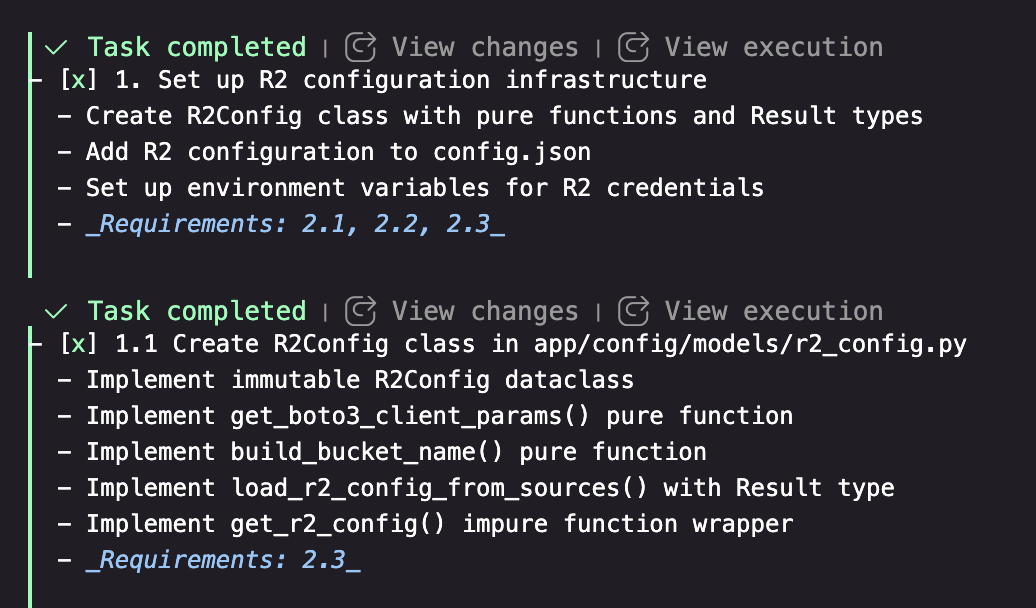
Once the design is signed off, Kiro generates a tasks.md — a sequenced implementation plan where every task maps back to specific requirements. Here’s the relevant subset for this example:
- [x] 1. Set up R2 configuration infrastructure
- [x] 2. Implement R2Service for object storage operations
         - upload_avatar, generate_presigned_url, delete_avatar, avatar_exists
- [x] 3. Update database schema for R2 object keys
- [x] 4. Refactor AvatarService to use R2
- [x] 8. Checkpoint — ensure all tests pass
In the Kiro IDE, each task is rendered as a clickable item. I just click on it and Kiro starts a new agentic session scoped to that task — it reads the requirements, the design, and the task description, and gets to work. No prompt needed. Each task is something I can review independently before moving to the next, which keeps the feedback loop tight and the output manageable.
3.2 How My Repository Is Structured#
The repository has two key hidden folders that together handle all the context sharing between tools:
project/
├── .claude/
│   ├── ARCHITECTURE.md
│   ├── DATABASE.md
│   ├── TESTING.md
│   ├── SECURITY.md
│   └── ...
├── .kiro/
│   ├── specs/
│   │   ├── r2-avatar-storage/
│   │   │   ├── requirements.md
│   │   │   ├── design.md
│   │   │   └── tasks.md
│   │   └── ...
│   └── steering/
│       └── project-patterns.md
.claude/ is the single source of truth for architectural knowledge — patterns, database conventions, testing strategy, deployment, security. Both Kiro and Claude Code read from it.
.kiro/steering/project-patterns.md is loaded automatically into every Kiro agent session (it has inclusion: always set). Rather than duplicating the architectural docs, it simply points Kiro at .claude/ for the details. One set of docs, two tools. Here’s what that looks like in the steering file:
## Reference Documentation

Always refer to the `.claude/` folder for detailed architectural patterns:
- `.claude/ARCHITECTURE.md` - Application structure and patterns
- `.claude/DATABASE.md` - Database patterns and migration system
- `.claude/DEPLOYMENT.md` - Deployment processes and Fly.io configuration
- `.claude/TESTING.md` - Testing strategies and test writing guidelines
- `.claude/SECURITY.md` - Security best practices and authentication
- ...
The key idea here is on-demand relevance. Neither Claude Code nor Kiro loads all of these at once — they pick up whichever doc is relevant to the task at hand. If I am working on a deployment, DEPLOYMENT.md gets pulled in. If I am writing tests, TESTING.md is what matters. This keeps the token cost low while still giving the AI the right context at the right time — without me having to paste anything into a prompt.
.kiro/specs/ holds one folder per feature, each with the three documents from the development cycle. Over time this becomes a full audit trail of every design decision made in the project.
3.3 Where I Spend Most of My Time in Kiro#
Fine-tuning the design document. This is where I invest the most time by far. The requirements Kiro generates are usually good enough out of the box — I rarely need to rework them significantly. But the design document is where I push back, adjust the architecture, and make sure the shape of the code reflects what I actually want before any implementation begins.
Reviewing the task list. Once the design is locked, I go through each task before running it. I check that the sequencing makes sense, that nothing is missing, and that the scope of each step is manageable enough to review properly after Kiro executes it.
Redoing work. This is normal and expected. There are times I realise mid-implementation that the design needs a tweak — a different approach to a service boundary, a change in how data is structured. When that happens, I go back to the design document, update it, adjust the affected tasks, and re-run them. It sounds like overhead but it is actually much cheaper than letting a bad design propagate through the codebase and cleaning it up later.
Attaching wireframes. For anything UI-related, I sketch it out first — even a rough hand-drawn diagram works. I attach it to the requirements document and Kiro uses it to inform the design. It keeps the requirements grounded in something visual rather than just prose.
3.4 Where Kiro Shines#
I do not use Claude Code nearly as much as I used to since switching to Kiro. The beginning was slow — getting the setup right, understanding how to structure specs, learning when to intervene and when to let it run. But once that clicked, I started producing code that was close to production-ready. Here is what made the difference.
No artificial rate limits. The pricing model is more straightforward, and there are no arbitrary pauses mid-flow. If I am in a coding sprint I can burn through my monthly credits in a few days — and that is fine. I can see my remaining credits right in the bottom corner of the IDE, so I always know where I stand. In my experience, a feature costs somewhere between 100 and 500 credits — the higher end being for larger, more complex changes that require significant iteration and design work.
Rich requirements, without writing code. Kiro lets me attach hand-drawn wireframes to the requirements document. I can sketch something on paper, photograph it, attach it, and Kiro uses it as input when generating the design. I can also ask it to refine those sketches into more precise images for pixel-perfect requirements. The point is: I can go deep into what I want without ever touching implementation details.
Patterns get called out automatically. My codebase has a fairly strict design — layered architecture, clear module responsibilities, consistent conventions. Over time I noticed I had to do less and less micro-management in the design phase. Kiro started calling out my own patterns in the generated design docs without me prompting it. The steering file and .claude/ docs were doing their job.
Information flow as a first-class concern. As someone who thinks in systems, I love being able to specify exactly how data moves through the application before any code is written. Here is an example from a feature I built to add conversations to game sessions for a board game helper application I was building — Kiro laid out the full stack flow before writing a single line:
┌──────────────────────────────────────────────────┐
│                 Frontend (React)                 │
│                                                  │
│  GameSessionDetail Page                          │
│  ├─ ConversationList Component                   │
│  ├─ ConversationThread Component                 │
│  └─ ConversationForm Component                   │
│                                                  │
│  API Service Layer                               │
│  └─ authenticatedFetch() with JWT                │
└──────────────────────────────────────────────────┘
                         │
                     HTTP/JSON
                         │
                         ▼
┌──────────────────────────────────────────────────┐
│                Backend (FastAPI)                 │
│                                                  │
│  ├─ API Layer (routing, auth, validation)        │
│  ├─ Service Layer (business logic, permissions)  │
│  └─ Database Layer (raw SQL with asyncpg)        │
└──────────────────────────────────────────────────┘
                         │
                         ▼
┌──────────────────────────────────────────────────┐
│               PostgreSQL Database                │
└──────────────────────────────────────────────────┘
Having this written down before implementation means there is no ambiguity about where data lives, what triggers what, and who owns which step. It is also a gift to your future self when debugging.
Testing is never forgotten. Unit tests and user acceptance tests are part of the design, not an afterthought. The task list always includes test coverage as a requirement, so by the time a feature is “done”, the test plan has been executed too.
3.5 Some Traps to Avoid#
Not everything needs a spec. Kiro has a vibe coding mode for smaller changes — the equivalent of just asking Claude directly. For a quick bug fix or a minor UI tweak, opening a full spec is overkill. Knowing when to skip the process is part of using it well.
Don’t keep the same agent session alive when you hit a design problem. This was a trap I kept falling into early on. If a task surfaces a flaw in the design document, the instinct is to fix it in the same agent session and carry on. The problem is the session accumulates context, gets long, and eventually runs into limits — producing worse output the longer it runs. The correct approach is to stop, fix the design document and the task list first, then start a fresh agent session. That way the fix is repeatable and the session starts clean.
Don’t run too many tasks at once. Just because you can queue up multiple tasks doesn’t mean you should. I want production-grade code, and that means spending real time reviewing what Kiro writes. Running too many tasks in parallel makes it very easy to lose track of what has actually been implemented and whether it matches the design. One task at a time, review it, then move on.
4. What’s Next#
Working with Kiro reminded me of the deep design conversations I used to have with a colleague in my early days at Zalando. They would start the day with a smoking break, and we would spend half an hour ideating on how to approach a problem. By the time we sat back down, we had a clear design, split tasks, and by lunch we were sharing PRs and reviewing each other’s work. Kiro, at its best, recreates that dynamic.
Over the course of my experiments I built 20+ features of varying complexity. The results were close to production-level software changes provided I controlled every aspect of design. This is rather promising, but comes with a tradeoff of not having the promised efficiency gains. In terms of productivity, I would estimate Kiro makes me somewhere between 50% and 75% more productive in generating software changes — and I am speculating here, so take that with a pinch of salt. What I can say is that it is not the 2x, 3x, or 4x gains you often hear claimed with vibe coding. Those numbers may be real for certain tasks, but for the kind of design-first, production-conscious work I care about, 50–75% is a meaningful and honest estimate. That gives me three threads I want to pull on next.
Multi-repo and distributed systems. My experiments were on a single, relatively large full-stack monolith — the kind of application where an AI agent has everything it needs in one place. That is not the reality for most companies working with microservices and distributed systems. As a systems engineer at heart, I want to explore how Kiro-driven development works across multiple repositories. Does it need an orchestrator repo, with all dependent repos checked out locally at known paths? That pattern is not unheard of — Go programmers will recognise it immediately.
Comparing spec driven tools. Kiro is one implementation of a broader idea. I want to try other tools that support spec driven development — GitHub Spec Kit being the obvious next candidate — and compare results across the same kinds of problems.
Productionising the mental model. The more I work with AI-assisted development, the more I notice that my 16+ years of experience across different types of software and scale gave me a significant advantage. Those years built mental models that help form abstractions quickly — and those abstractions translated directly into better specs, better design docs, and better output from Kiro. The question I am sitting with is: how do you productionise that skill? How do you get consistency in the software that comes out — regardless of whether the author is a human (hypbrid approach) or an agent? Stay tuned.